history模式与hash模式

一.history模式

1.前端打包

①vue中配置mode属性

1
2
3
4
5
6
7
8
9
10
11
12
13
14
15
16
17
18
19
20
21
22
23
24
25
26
27
28
29
30
31
32
33
34
35
36
37
38
39
40
41
42
43
44
45
46
47
48
49
50
51
52
53
54
55
56
57
58
59
60
61
62
63
64
65
66
67
68
69
70
71
72
73
74
75
76
77
78
79
80
81
82
83
84
85
86
87
88
89
90
91
92
93
import VueRouter from 'vue-router'
import About from "@/pages/About.vue";
import Home from "@/pages/Home.vue";
import News from "@/pages/News.vue";
import Message from "@/pages/Message.vue";
import Detail from "@/pages/Detail.vue";

const router =new VueRouter({
mode: 'history',
routes: [
//一级路由
{
name:"guanyu",
path:"/about",
component: About,
meta:{title:"关于",isAuth:true}

},
{
path:"/home",
component: Home,
meta:{title:"主页"},

children:[
{
name:'news',
path:"news",
component:News,
meta:{isAuth:true,title:"新闻"},
beforeEnter:(to, from, next)=>{
if(to.meta.isAuth){
console.log("isAuth完成")
if(localStorage.getItem("school")==="石家庄学院" ){
next()
}else{
alert("学校名不对啊,你没有这个权限查看")
}
}else{
next()
}
},


},
{
name:"message",
path:"message",
component:Message,
meta:{isAuth:false,title:"消息"},
children:[
{
name:"xiangqing",
path:"detail",
component:Detail,
meta:{isAuth:true,title:"详情"},
props($route){
return {
id:$route.query.id,title:$route.query.title,
}
}
}
]
}
]
},

]
})


router.beforeEach((to, from, next) => {
console.log("前置守卫启动!")
if(to.meta.isAuth){
console.log("isAuth完成")
if(localStorage.getItem("school")==="石家庄学院" ){
next()
}else{
alert("学校名不对啊,你没有这个权限查看")
}
}else{
next()
}
})

router.afterEach((to,) => {
console.log("后置守卫启动!")
document.title = to.meta.title || "随便写的"

})


export default router ;

②用打包指令:npm run build打包

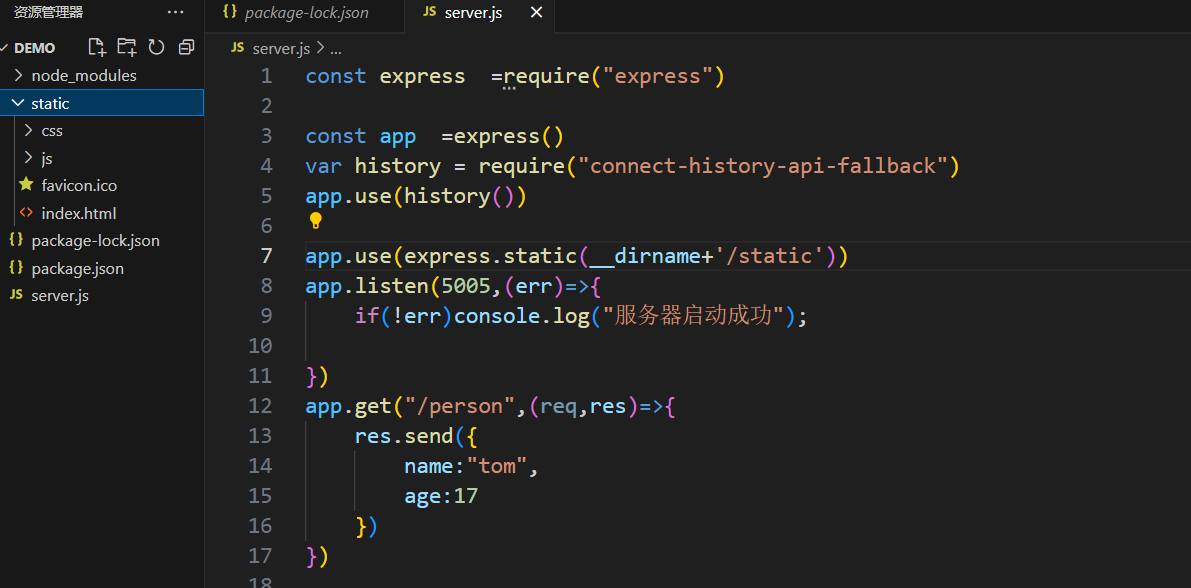
2.服务器端运行

①将打包资源放到服务器端

image-20241212122026009

②服务器端运行

用命令node server运行

二.hash模式

1.前端打包

①vue中配置mode属性

1
2
3
4
5
6
7
8
9
10
11
12
13
14
15
16
17
18
19
20
21
22
23
24
25
26
27
28
29
30
31
32
33
34
35
36
37
38
39
40
41
42
43
44
45
46
47
48
49
50
51
52
53
54
55
56
57
58
59
60
61
62
63
64
65
66
67
68
69
70
71
72
73
74
75
76
77
78
79
80
81
82
83
84
85
86
87
88
89
90
91
92
93
import VueRouter from 'vue-router'
import About from "@/pages/About.vue";
import Home from "@/pages/Home.vue";
import News from "@/pages/News.vue";
import Message from "@/pages/Message.vue";
import Detail from "@/pages/Detail.vue";

const router =new VueRouter({
mode: 'hash',
routes: [
//一级路由
{
name:"guanyu",
path:"/about",
component: About,
meta:{title:"关于",isAuth:true}

},
{
path:"/home",
component: Home,
meta:{title:"主页"},

children:[
{
name:'news',
path:"news",
component:News,
meta:{isAuth:true,title:"新闻"},
beforeEnter:(to, from, next)=>{
if(to.meta.isAuth){
console.log("isAuth完成")
if(localStorage.getItem("school")==="石家庄学院" ){
next()
}else{
alert("学校名不对啊,你没有这个权限查看")
}
}else{
next()
}
},


},
{
name:"message",
path:"message",
component:Message,
meta:{isAuth:false,title:"消息"},
children:[
{
name:"xiangqing",
path:"detail",
component:Detail,
meta:{isAuth:true,title:"详情"},
props($route){
return {
id:$route.query.id,title:$route.query.title,
}
}
}
]
}
]
},

]
})


router.beforeEach((to, from, next) => {
console.log("前置守卫启动!")
if(to.meta.isAuth){
console.log("isAuth完成")
if(localStorage.getItem("school")==="石家庄学院" ){
next()
}else{
alert("学校名不对啊,你没有这个权限查看")
}
}else{
next()
}
})

router.afterEach((to,) => {
console.log("后置守卫启动!")
document.title = to.meta.title || "随便写的"

})


export default router ;

②用打包指令:npm run build打包

2.服务器端运行

①将打包资源放到服务器端

②安装中间件 connect-history-api-fallback

​ 安装指令:

1
npm i connect-history-api-fallback

③后端引入(必须得在静态资源前引入)调用:

1
2
3
const history = require('npm i connect-history-api-fallback');
......
app.use(history())

④服务器端运行

用命令node server运行